How to change the model in product photos without reshooting
You can change the model in an existing product photo by swapping in an approved face and rebuilding the hair to match, while the garment, fit, pose and lighting stay exactly as shot. With Headloom that takes about a minute per photo, in high resolution, with no pixel shift, so catalogues refresh without a new shoot.
Why the person in the photo has to change
The person in the photo is a fashion model, but the garment is the product. A face swap puts an approved face into that frame and rebuilds the hair to match, so it works like a head swap, not a mask. It does not keep the original hair. Teams use it to change the model without a reshoot. The sample is already shot and the fit is approved. Calling the same model back would mean another day rate, another studio and another week before the line can go up.
It usually comes up in one of these ways:
- The reshoot is the expensive part. The garment is right. Only the person is wrong, or no longer available.
- The model from the original shoot can't come back, and the product still has to launch.
- Another market needs a different face on the same clothes. The product stays the same. The person changes.
- The brand wants the same model face across the catalogue, so a wall of shirts reads as one person.
That's how you replace the model in catalogue photos you've already paid for, instead of shooting the set again.
What has to change, and what must not move
The identity changes. Face, hair and hairline are rebuilt together, and the skin is matched where the new head meets the neck, so the person doesn't look pasted on. That pasted-on look is exactly what catalogue teams are trying to avoid.
What must not move is the product: print, colour, buttons, seams, drape, fit, hands, background and light. If a stripe shifts or a button wanders, the file was rebuilt, not edited. You want to swap the model face in product photos and leave the garment lines where the photographer put them.
Results come back in high resolution, with no pixel shift, which keeps those lines aligned with your upload. Headloom doesn't restage the shot.
Three steps, about a minute
There's no mask to paint and no prompt to write. A full head swap for catalogue work uses the same three steps as a single frame, and the output is a whole-head edit either way.
- Photo to change. Upload the product shot. The garment, fit, pose, hands, background and light in this file are the parts that stay.
- Approved head to use. Upload a photo of the person who has agreed. Reuse that same file on every SKU so the line stays consistent.
- Download. About a minute later, including the safety check, you get the same shot back. The face is new, the hair is rebuilt with it, and the product is the one you uploaded.
One approved face across the line
Louis Philippe uses Headloom for its shirt catalogue, with one approved face across every shirt. You can see the same face on the mint shirt, the light blue shirt and the cream linen shirt.
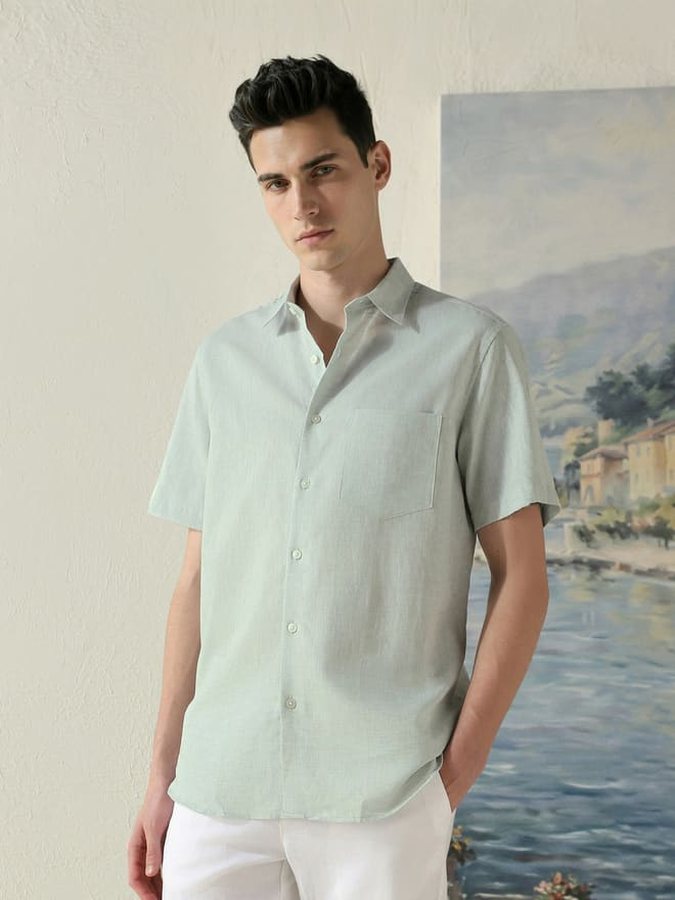
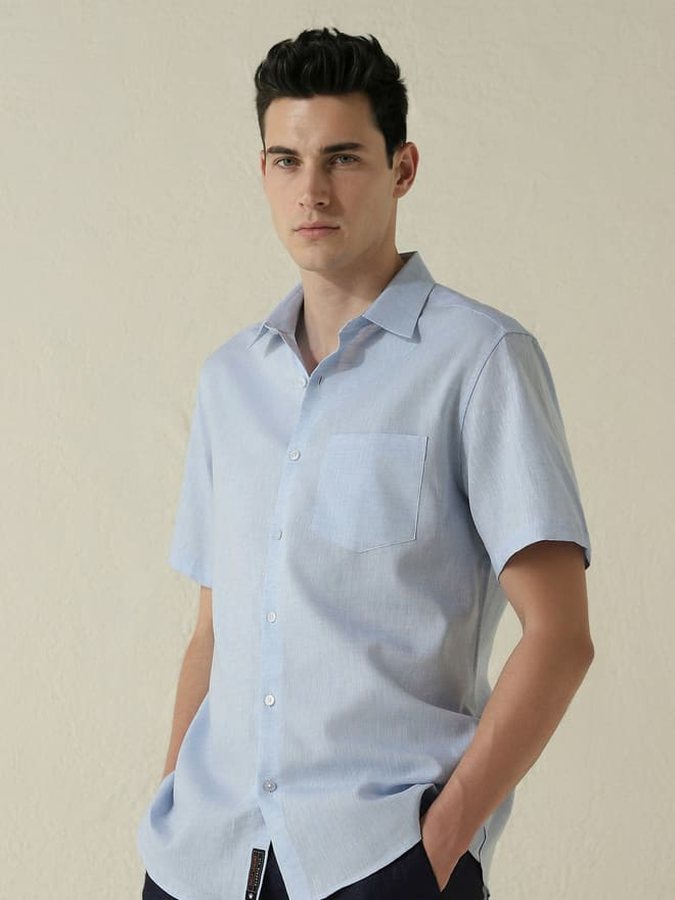
These are live shirt pages, not a before-and-after slider. One approved face, two garments, and the clothes exactly as they were shot.
About 22,000 images generated on Headloom's Hugging Face Space.
When the job is a whole line rather than one frame, see AI model face swap for catalogues.
A run of forty shirts doesn't need forty new setups. It needs one approved head and the product shots you already have. Each frame is its own swap, so a tricky angle on one garment doesn't spoil the rest of the line. If one frame doesn't work, download that frame and run it again with a clearer head photo.
Consent, and what happens to the files
The brand holds the model release for the person whose face goes on the garment. Only use identities you're allowed to use. This is general information, not legal advice, and it isn't a promise that a marketplace will accept the image. Check the disclosure rules of each place you sell. If a platform asks you to label an AI edit, label it.
Uploads are deleted within 24 hours of upload and results within 24 hours of being made. We never use photos or results to train AI models. The details are on the responsible use page.
Plans when the catalogue keeps going
A handful of frames fits the free start: 10 free swaps when you sign up, during beta. A line that keeps shipping fits a monthly plan. See pricing for the monthly plans and for pay as you go. Every plan returns the same kind of file. The plans differ by how many swaps you need.
Enterprise runs on Headloom's servers. Special setups are worked out case by case, for brands that need one. Catalogue team? Talk to us.
Tips for a clean swap
- Use a clear, front-facing head photo, with both eyes visible.
- Keep the angle and the light close to the product photo you're changing.
- One person in the frame. A second face in the background is a different job.
- Reuse the same approved head file across the SKUs you want to match.
- Skip sunglasses, hats and hands across the mouth. Those are the usual reasons for another try.
- The photo needs a person wearing the product. Flat lays and empty mannequins are out of scope.
To update the model in product photography, start from a frame where the garment is already right. Still choosing which name belongs on the brief? Read face swap vs head swap.
Questions
Can I change the model in a product photo without a reshoot?
Yes. Swap in an approved model's head. The garment, fit, pose and light stay as shot.
Does the clothing change at all?
No. Only the head region changes. Results come back in high resolution, with no pixel shift, so garment lines stay aligned.
Does the swap change the hair too?
Yes. The face and hair are rebuilt together, so the new person looks natural instead of pasted on. It does not keep the original hair.
Can I use one face across hundreds of SKUs?
Yes. Reuse the same approved head photo for every swap.
Do I need a model release?
Yes, from the person whose face you use. This is general information, not legal advice.
Is there a free trial?
10 free swaps when you sign up, during beta. No card.
Where does a catalogue swap run?
Headloom runs on Headloom's servers. Special setups are worked out case by case. Talk to us if your catalogue needs one.
Can I change the model in a video?
Not yet. Headloom works on photos.