How to put a head on another body in a photo
To put a head on another body, upload the body photo you want to keep and a clear headshot of the person who should appear in it. Headloom replaces the whole head, face and hair together, and leaves the outfit, pose, hands, background and light as shot. It takes about a minute per photo.
The job: one body photo, one headshot
The request is almost always the same. Someone has a photo where the outfit, pose and setting are right, and a separate headshot of the person who should be in it. They want that head on that body. On freelance sites it's posted as "full head-with-hair replacement" or "swap the whole head, not just the face". On photo-request forums it reads "take the headshots provided and put them on the body photo".
A head swap does exactly that job. You keep the body photo and change who is in it.
Common reasons:
- A business portrait where the suit, office and light are right, but the face in it isn't the person who needs it.
- A product or fashion photo where the garment is approved and only the model has to change.
- A photo where the best outfit and the best expression ended up in two different frames.
- A brand that wants the same approved face on every photo in a set.
Why pasted faces look fake
Most quick tools paste a face on top of the old one. The face moves, but the hairline, head shape, ears and hair stay from the old person, so the result looks like a mask. People in AI forums describe it as "cartoonish", "plastic", or a head that is "too big compared to the rest of the body".
A whole-head swap avoids that by rebuilding the face, hairline and hair together, then matching the skin where the new head meets the neck. It does not keep the original hair. The body, clothes and hands are left alone, so the photo still lines up with the one you uploaded.
Three steps
- Body photo. Upload the photo you want to keep. The outfit, pose, hands, background and light in this file are the parts that stay.
- Headshot. Upload a clear photo of the person who should appear. Front-facing works best, with both eyes visible.
- Download. About a minute later, including the safety check, you get the same photo back with the new head. Results come back in high resolution, with no pixel shift.
If one result isn't right, run it again with a clearer headshot. Each swap is its own run.
Get a clean result
- Match the angle. A headshot turned the same way as the body photo blends best.
- Match the light. A soft-lit headshot on a soft-lit body photo looks natural; harsh flash on one side does not.
- One person per photo. A second face in the background is out of scope.
- Skip sunglasses, hats and hands across the face in the headshot.
- Use a sharp headshot. Blur in the headshot shows up in the result.
Before and after
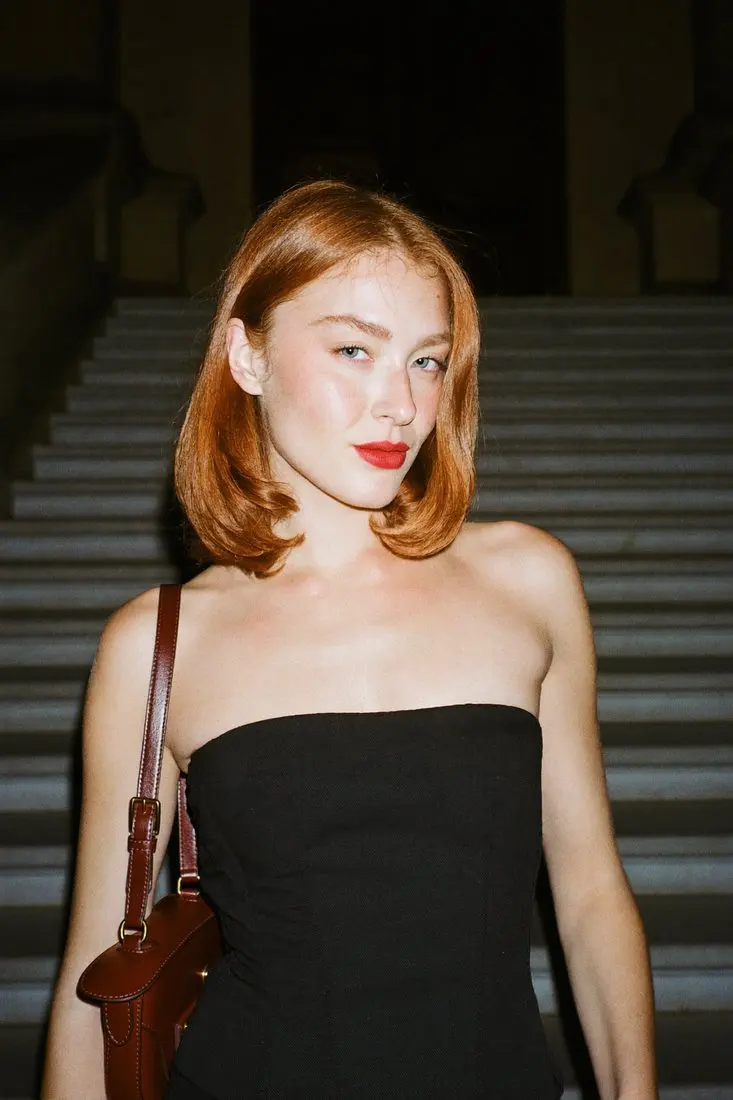
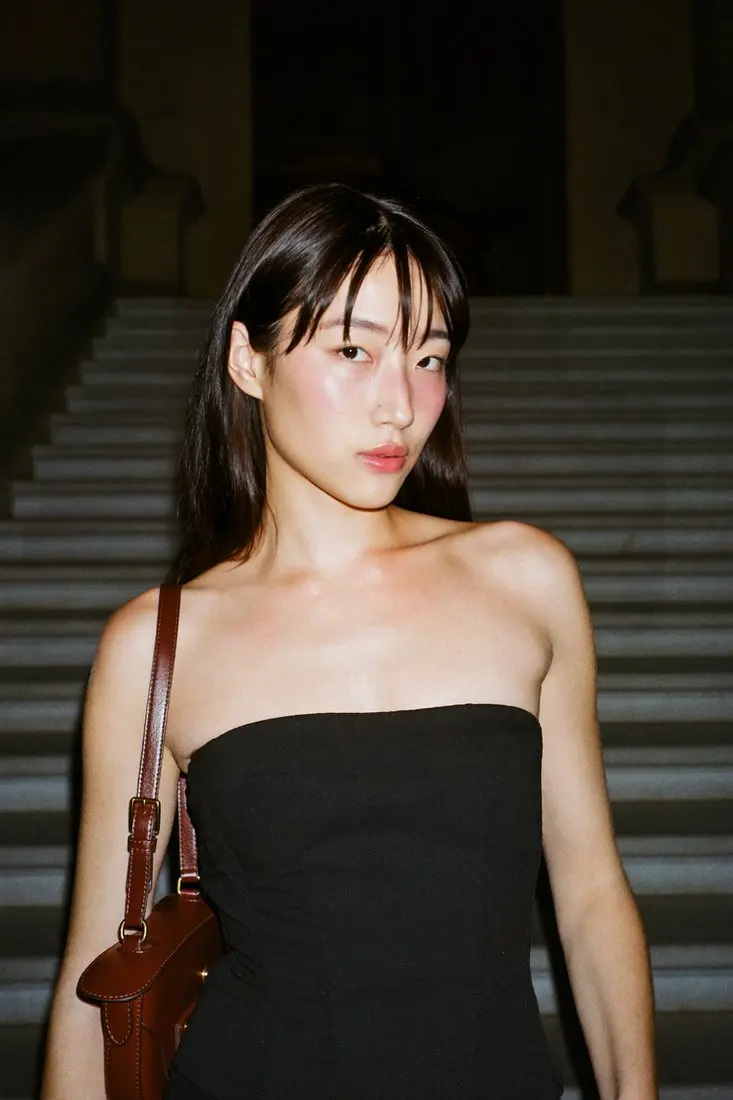
These are stored before and after examples from Headloom, not a live swap. The face and hair change together. The dress, the hands and the staircase don't.
Whose head you can use
Only use a head you are allowed to use: your own, or a person who has agreed. Every swap on Headloom asks you to confirm that. Celebrity and public-figure swaps, sexual content and anything meant to deceive are not allowed. This is general information, not legal advice. If a platform asks you to label an AI edit, label it.
Uploads are deleted within 24 hours of upload and results within 24 hours of being made. We never use photos or results to train AI models. The details are on the responsible use page.
When it's a whole set, not one photo
If you need the same head across many photos, reuse the same headshot file on every swap so the set reads as one person. That is how catalogue teams use it: Louis Philippe uses Headloom for its shirt catalogue, with one approved face across every shirt. For the catalogue version of this job, read how to change the model in product photos. Not sure whether you need a head or only a face? Read face swap vs head swap.
A few photos fit the free start: 5 free swaps when you sign up, during beta. See pricing for monthly plans and pay as you go.
Questions
Can I put my headshot on a different body photo?
Yes, if you are the person in the headshot or you have their permission. Upload the body photo and the headshot, and the head is replaced.
Does it swap the whole head or only the face?
The whole head. Face, hairline and hair are rebuilt together. It does not keep the original hair.
Will the clothes or the pose change?
No. Only the head region changes. The outfit, pose, hands, background and light stay as shot, in high resolution, with no pixel shift.
Why do free tools look fake on this job?
Most free tools only paste a face over the old one, so the hairline, head shape and skin tone don't match the body. A whole-head swap rebuilds those together.
Can I swap a head into a group photo?
Headloom works on one person per photo. A second face in the frame is a different job.
Is there a free trial?
5 free swaps when you sign up, during beta. No card.